
Program Summary
ClearBadge helps consumers confirm that they are interacting with a real, verified professional. During a live interaction, a professional may ask the consumer whether they would like to receive a secure ClearBadge trust session link by SMS so they can open the session on their own device.
| Purpose | Deliver a secure trust session link for the current live interaction. |
|---|---|
| Message type | Transactional only. No marketing or promotional content is included. |
| Recipient | A consumer actively speaking with or otherwise interacting with a verified professional. |
| Trigger | The consumer gives affirmative verbal consent before the SMS is sent. |
| Frequency | One SMS per trust session request. |
| Opt-out and help | Recipients can reply STOP to opt out or HELP for help. |
| Terms and privacy | https://clearbadge.org/smstos |
Verbal Opt-In Flow
- A verified ClearBadge professional is already engaged in a live call or active customer interaction.
- The professional determines that a secure trust session link would help the consumer view the live interaction on their own device.
- Before any SMS is sent, the professional asks the consumer for permission using the ClearBadge verbal consent disclosure.
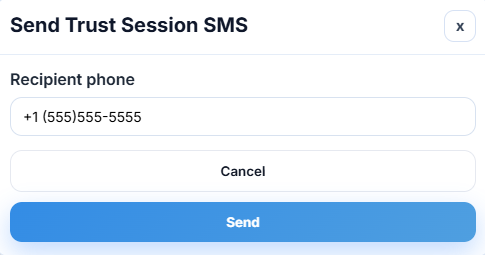
- The SMS is sent only after the consumer gives an affirmative verbal response and provides the mobile number to receive the one-time message.
- The message contains a unique trust session URL for that specific interaction and standard opt-out language.
Consent Script Presented to the Consumer
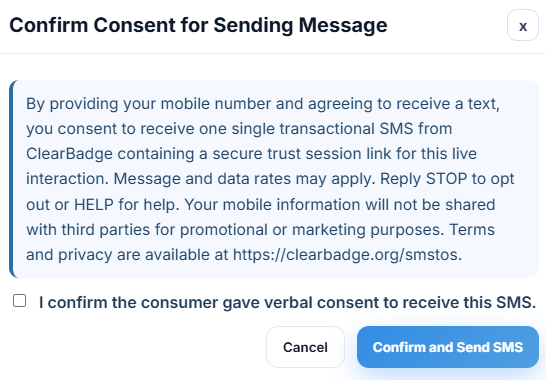
ClearBadge requires the professional to ask for verbal consent before sending the SMS invitation. The consent language used for this flow is:
                By providing your mobile number and agreeing to receive a text, you consent to receive one single
                transactional SMS from ClearBadge containing a secure trust session link for this live interaction.
                Message and data rates may apply. Reply STOP to opt out or HELP for help. Mobile opt-in data and
                consent information will not be shared with third parties or affiliates for marketing or promotional
                purposes. Terms and privacy are available at https://clearbadge.org/smstos.
Reviewer Screenshots
The screenshots below show the ClearBadge trust session SMS workflow used for reviewer documentation.
Sample SMS Content
The production SMS body is transactional and contains the professional name, secure session URL, time limit information, expiration information, and STOP language. A representative example appears below.
ClearBadge: [Verified Professional Name] (Verified) started a secure live trust session with you.

Access: https://clearbadge.org/s/[session-link]

Session limit: up to [duration]. Link expires in [expiration]. Session ID: [session-id] Reply STOP to opt out.
Actual session duration, expiration, and session ID values vary by trust session.
Compliance Controls
- ClearBadge uses this flow only for one-time transactional trust session access.
- No marketing campaign, promotional sequence, or recurring SMS program is attached to this route.
- The consumer is informed that message and data rates may apply.
- The consumer is informed that they may reply STOP to opt out or HELP for help.
- Mobile opt-in data and consent information are not shared with third parties or affiliates for marketing or promotional purposes.
- The public SMS terms and privacy disclosures are available at /smstos.